Official ManualDownload & Installation

Shadowrocket Downloads for Every Platform

Open the App Store or choose the package for your device architecture. Check system requirements before installing.

Current version v2.2.92 · Mac, Windows, Android, and Linux versions are free; iPhone / iPad is a one-time $2.99

01 · Devices

Downloads for all platforms

Downloading for another device? Select its platform card below instead of using the button matched to your current device. On Mac, check the chip; on Windows and Android, check the architecture. On Linux, also check your distribution's package format. If a platform offers multiple packages, choose the one that matches your device.

iPhone / iPad

One-time purchase of $2.99. For iPhone and iPad; Mac, Windows, Android, and Linux versions are free. Requires iOS / iPadOS 13.0 or later; check the App Store page for current requirements.

On the product page, check the developer, icon, and app ID, then confirm device compatibility. If you previously bought the app with this account, check your purchase history or look for the redownload icon.
Check your App Store account region

Mac

Free. Like Windows, Android, and Linux, the Mac version is free from this site; the iPhone / iPad app is a one-time $2.99 App Store purchase. Requires macOS 12 or later. Separate .dmg packages are available for Apple silicon and Intel.

Not sure which one to get? Open About This Mac from the Apple menu and check Chip or Processor. Choose Apple silicon if it lists an Apple chip, or Intel if it lists an Intel processor.

Windows

Free. Like Mac, Android, and Linux, the Windows version is free from this site; the iPhone / iPad app is a one-time $2.99 App Store purchase. This site provides a 64-bit .exe installer for x64 devices.

Check System type under Settings → System → About. Confirm that it says x64, then open the installer after it finishes downloading. If your device is managed by your employer or school, check that you’re allowed to install apps yourself.

Android

Free. Like Mac, Windows, and Linux, the Android version is free from this site; the iPhone / iPad app is a one-time $2.99 App Store purchase. The .apk package is for arm64 devices, including most recent Android phones and tablets.

If the download doesn't start in WeChat's built-in browser, use its menu to open this page in your system browser, then select the package. If the system reports an architecture mismatch, check your device specifications instead of repeatedly installing the same file.

Linux

Free. Like Mac, Windows, and Android, the Linux version is free from this site; the iPhone / iPad app is a one-time $2.99 App Store purchase. These packages support x86_64; Debian-based distributions commonly refer to the same architecture as amd64.

Choose .deb for Debian / Ubuntu and .rpm for Fedora / openSUSE. Other compatible x86_64 distributions can use AppImage. To check your architecture, run uname -m.

02 · Installation

First-time installation and system prompts

Packages from this site aren't code-signed, so your system may ask you to confirm during installation or the first launch. Follow the steps below only for a file downloaded from this page that matches your device. If a prompt mentions malware detection, device management, or another issue, address that specific warning first. Don't disable system-level protections just to run the app.

SystemFirst-time installation and handling prompts
Windows Double-click the downloaded .exe. If SmartScreen says “Windows protected your PC,” first confirm the file's source and that your device policy allows installation. Select More info, verify that the app shown is the installer you just downloaded, then select Run anyway. If that option isn't available, don't disable SmartScreen to bypass the prompt.
macOS Open the .dmg and drag Shadowrocket to Applications. If you see “cannot verify the developer,” dismiss the prompt, then go to System Settings → Privacy & Security and select Open Anyway. If you see “is damaged,” download the file again from this page and confirm the download completed. If you confirm the issue is caused by the system quarantine attribute and the app is in Applications, run xattr -cr /Applications/Shadowrocket.app in Terminal and try again. This command recursively removes extended attributes from this app directory only; it cannot repair a genuinely damaged file.
Android Once the download finishes, open the .apk from your browser's downloads list. If Android asks you to allow installation from unknown apps, open the settings shown in the prompt, enable Allow from this source for the browser that started the installation, then return to finish installing. You can turn off this permission in the same settings afterward. If you opened the file from a file manager, Android may ask you to grant permission to that app instead.
Linux On Debian / Ubuntu, open a terminal in the folder containing the file and run sudo apt install ./filename.deb. On Fedora / openSUSE, open the .rpm with your distribution's package manager. For AppImage, run chmod +x ./filename.AppImage in the folder containing the file, then open it. Replace the filename in each command with the full downloaded filename. If the package manager reports an architecture or dependency mismatch, note the exact message and check the package format.
iPhone / iPad After downloading from the App Store, open Shadowrocket from the Home Screen. The first time you enable a connection, iOS may ask permission to add a VPN configuration. This system permission is required for connections and is unrelated to your App Store purchase. If you aren't ready to connect, you can check the interface in Home and import an existing configuration first.

Opening the app confirms only that installation is complete. Before connecting, import your own subscription or server details and make sure Global Routing is set to the mode you expect. For your first setup, follow the user guide step by step.

03 · App Store

App Store and account region

This section applies to iPhone and iPad only. Shadowrocket isn't available in the mainland China App Store. The apps you can browse depend on the country or region of the Apple ID used for Media & Purchases, not your device's display language. The storefront in a product page link also doesn't change your account region. If you can't find the app, check your account first, then determine whether the issue is storefront availability or device compatibility.

  1. Open Settings, tap your Apple ID name at the top, then tap Media & Purchases. If you use more than one account, confirm that this is the account actually used for purchases on this device.
  2. Tap View Account and verify your identity if prompted, then open Country/Region. This shows the storefront used by the account. It's separate from General → Language & Region.
  3. If you need to change your account's region, select Change Country or Region on the same page and follow Apple's instructions. Before submitting, check whether your balance, active subscriptions, and payment method meet the new storefront's requirements. Follow the guidance shown on your account page.

If the product page opens but the install button says your system isn't compatible, check the system requirements on the App Store page and your device's current OS version in Settings. Changing storefronts won't change which OS versions your device supports.

04 · Verification

Verify the official app and interface

Check these three details before buying

  1. Developer: On the App Store product page, check below the app name or in the details section for Shadow Launch Technology Limited.
  2. Icon: Compare it with the official icon beside the download details on this page: a rocket outlined in blue and purple on a white background. Use the icon as a supporting check, not as the sole basis for a purchase.
  3. App ID: Check for id932747118 at the end of the product page URL. The developer name and ID must both match. Don't choose an app based only on its name in search results.

An app with the same name listed as free in the App Store is counterfeit; the redownload icon on the purchased official product page indicates an existing purchase. The U.S. App Store price for iPhone / iPad is a one-time $2.99. Mac / Windows / Android / Linux versions are free; get their installers only from this site's /dl/ path.

What to check after the first launch

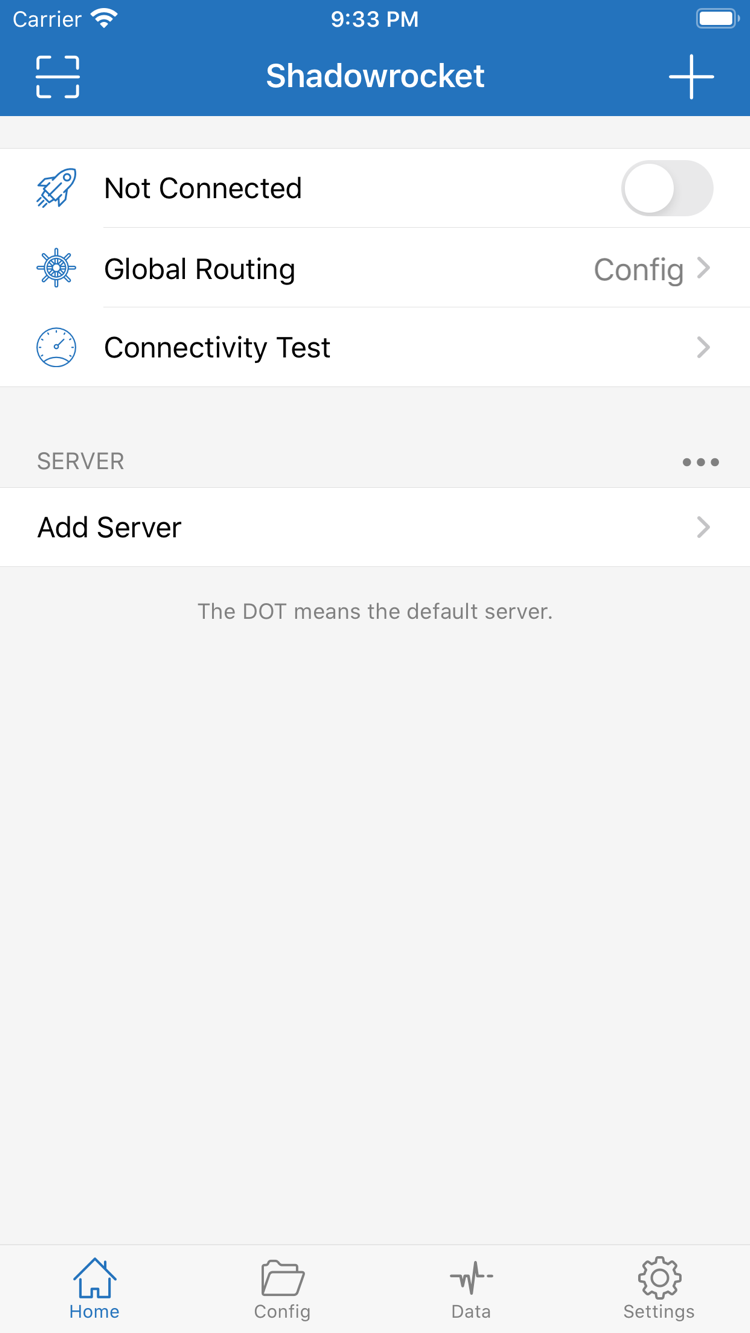
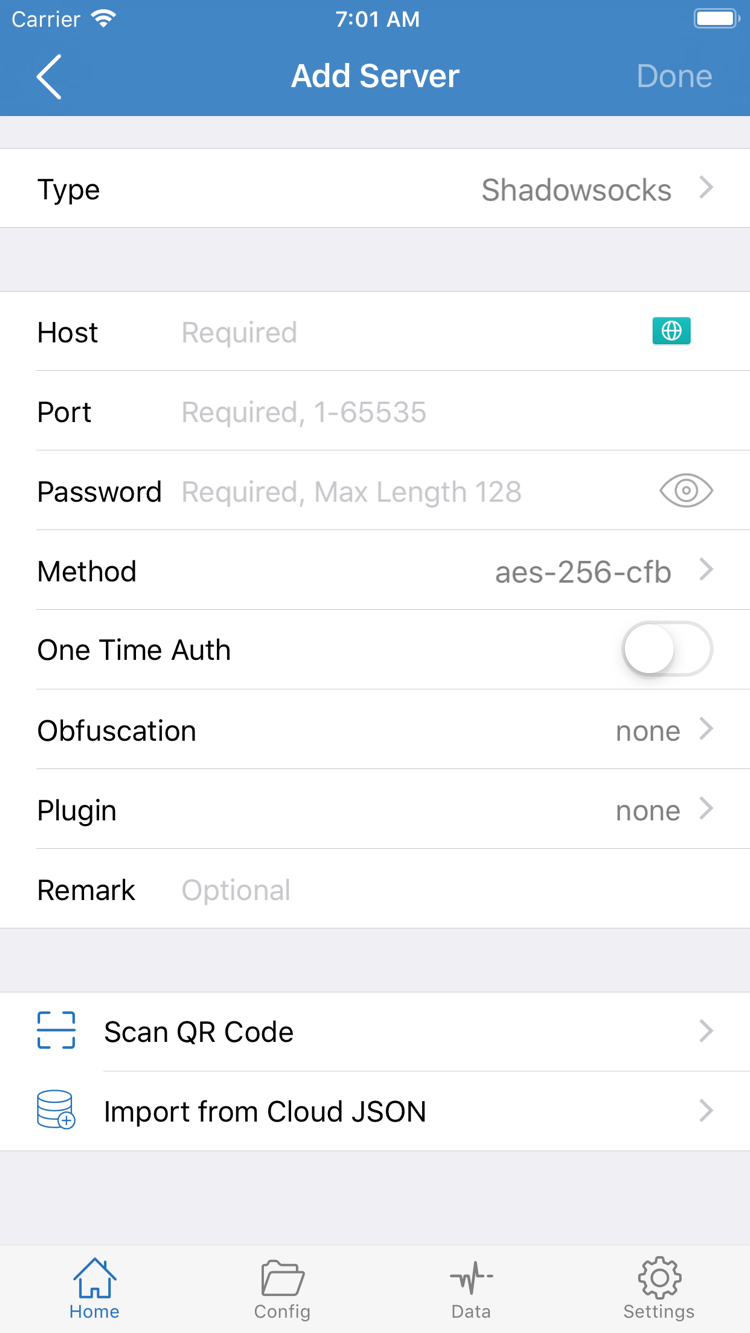
The two screenshots on the right or below are from the App Store. In Home, Not Connected means there is no active connection, while Global Routing shows the current routing option. Fields in Add Server vary with the selected Type. The screenshot is for reference only; enter the details for your own server.

Shadowrocket Home screen showing the connection toggle, Global Routing, Connectivity Test, and SERVER group
Home: Check connection status and Global Routing, or open Add Server from the SERVER group.
Shadowrocket Add Server screen showing the Type, Host, Port, Password, and Method fields
Add Server: Choose a Type based on your existing server details, then fill in the corresponding fields.
05 · Restore

Restore purchases after reinstalling or switching devices

An iPhone and iPad using the same Apple ID share one purchase. Before switching devices, confirm which account you used for the App Store purchase. The account shown for iCloud may differ from the one used for Media & Purchases. If you still have the old device, check the purchase history on its App Store account page first.

  1. On the new device, open the App Store, tap your profile picture to open your account page, and confirm you're signed in with the account used for the original purchase. Then open Purchased. Menu labels may vary slightly by storefront.
  2. Search for Shadowrocket in your purchase history and tap the redownload icon. If the product page shows a price but you believe you've already bought it, check the account, storefront, and purchase history before placing another order.
  3. Open the redownloaded app and check the configuration status in Home. Restoring the app from the store restores your right to download it, not the server list from your old device. If the list is empty, import your own subscription or server details again, then check Global Routing.

For a new computer or Android device, choose its package from downloads for all platforms. You don't need to restore an App Store purchase. Before switching, keep a secure copy of any configuration you're authorized to use. After confirming it works on the new device, you can clear the old one. Don't store files containing server passwords or subscription URLs in a public location.

06 · Pricing

Two ways to get Shadowrocket

The iPhone / iPad app costs a one-time $2.99 in the U.S. App Store; there is no monthly fee. The final price and currency are shown on the purchase confirmation page for your storefront. The Mac (Apple silicon and Intel), Windows, Android, and Linux versions are free, with packages provided here for each supported architecture and format.

Updates use the same channels: check the App Store for updates on iPhone / iPad; on other platforms, return to this page and choose the package for your device. After importing a configuration, see the official user manual for rule matching, connection checks, and routine maintenance.

07 · FAQ

Download and installation FAQ

Can I use Shadowrocket on a computer or Android phone?

Yes. The iPhone and iPad app is a one-time $2.99 purchase on the App Store. The Mac, Windows, Android, and Linux versions are free. For computers and Android devices, choose the package for your device architecture on this page.

Which Mac version should I choose: Apple silicon or Intel?

Open About This Mac from the Apple menu. If it lists Chip and names an Apple chip, choose the Apple silicon version. If it lists Processor and names Intel, choose the Intel version.

What should I do if Windows says “Windows protected your PC”?

After confirming the file came from this site and complies with your device management policies, treat this as a SmartScreen first-run prompt: select More info, then Run anyway. If Windows reports a threat or your management policy blocks the installation, stop.

What should I do if Shadowrocket doesn't appear in the App Store?

First check the country or region for the Apple ID used with Media & Purchases, then open the App Store product page linked here. Shadowrocket isn't available in the mainland China storefront. Opening the product page won't change your account's storefront.

Do I have to pay again when I get a new iPhone or reinstall the app?

If you bought Shadowrocket with the same Apple ID, you can download it again from Purchased in the App Store without paying again. The U.S. App Store price for iPhone and iPad is a one-time $2.99; the Mac, Windows, Android, and Linux versions are free.

Can I install Shadowrocket on an iPad?

Yes. Shadowrocket uses the same App Store product page on iPad and iPhone, and purchases are shared through the same Apple ID. Check the App Store page for device compatibility.